400 128 6709
行业新闻
 发布时间:2025-07-16
 点击次数:
点击次数: 本文介绍一种无需额外训练的自动化抄表方案,通过人工智能技术解决人工抄表费事、易出错的问题。该方案先配置图片屏幕区域坐标并预处理,再配置待识别元素坐标并裁剪,利用OpenVINO加载PaddleOCR模型识别文字,经结构化输出与后处理得到结果,无需大量贴合业务场景的数据集,适用于内容为文字的规整“表”。
☞☞☞AI 智能聊天, 问答助手, AI 智能搜索, 免费无限量使用 DeepSeek R1 模型☜☜☜
“表”是生活中的随处可见的一种设备。常见的“表”包括了家用电表,水表等设备;除此之外,还有工频场强计等“表”。受制于由于受到区域因素以及技术因素的制约,并非每种“表”都能够进行数据的自动采集,从而只能通过人工手动抄表。这种数据采集工作一方面较为费事和枯燥,另一方面,长时间工作带来的会导致工作人员疲劳,从而产生抄录错误。通过人工智能技术构造自动化的抄表流程能够极大的克服上述问题,提高工作效率。
迄今为止,已经有许多关于电表读数的优秀项目出现,这些项目大都依赖于对特定场景的模型训练(包括微调)。
例如:
但对于抄表工作的业务场景而言,具有以下特点:
因而,对于一些较为规整的“表”,我们完全可以基于开源OCR模型进行零微调的抄表工作。
本项目提供了有一种无需额外训练的抄表器,只需要人为指定一些和布局有关的配置信息,即可实现表中数据的记录。总体流程如下:

由于本项目是一个零微调的项目,因此,为了保证识别模型的有效性,需要人工对齐输入信息。
以下列图片为例,本节展示如何将图片从倾斜的状态,修正为正面观众的状态。
 In [3]
# 配置坐标信息# The coordinates of the corners of the screen in case 1POINTS = [[1121, 56],    # Left top
          [3242, 183],   # right top
          [3040, 1841],  # right bottom
          [1000, 1543]]   # left bottom# The size of the screen in case 1DESIGN_SHAPE = (1300, 1000)
In [5]
import cv2
import numpy as np# 定义仿射变换函数def pre_processing(img, point_list, target_shape):
    """
    Preprocessing function for normalizing skewed images.
    Parameters:
        img (np.ndarray): Input image.
        point_list (List[List[int, int], List[int, int], List[int, int]]): Coordinates of the corners of the screen.
        target_shape (Tuple(int, int)): The design shape.
    """

    # affine transformations
    # point list is the coordinates of the corners of the screen
    # target shape is the design shape

    target_w, target_h = target_shape
    pts1 = np.float32(point_list)
    pts2 = np.float32([[0, 0],[target_w,0],[target_w, target_h],[0,target_h]])

    M = cv2.getPerspectiveTransform(pts1, pts2)
    img2 = cv2.warpPerspective(img, M, (target_w,target_h))    return img2
In [6]
import matplotlib.pyplot as plt# 执行预处理img = cv2.imread('example1.jpg')# affine transformations to normalize skewed imagesimg = pre_processing(img, POINTS, DESIGN_SHAPE)# The screen part is cropped and correctedplt.imshow(img)<matplotlib.image.AxesImage at 0x7fa87a3e9510>
<Figure size 640x480 with 1 Axes>
PaddleOCR 是PaddlePaddle的文字识别套件。迄今为止,PaddleOCR已经提供了许多复用性强的预训练模型。在本项目中使用的预训练模型是Chinese and English ultra-lightweight PP-OCR model (9.4M)。更多的信息请参考PaddleOCR Github或PaddleOCR Gitee。
一个标准的OCR流程包括了文字检测和文字识别,对于本项目来说,文字检测工作已经通过人工配置的方式解决了,因此,只需要进行文字识别即可。
 简小派
简小派
简小派是一款AI原生求职工具,通过简历优化、岗位匹配、项目生成、模拟面试与智能投递,全链路提升求职成功率,帮助普通人更快拿到更好的 offer。
 123
查看详情
123
查看详情

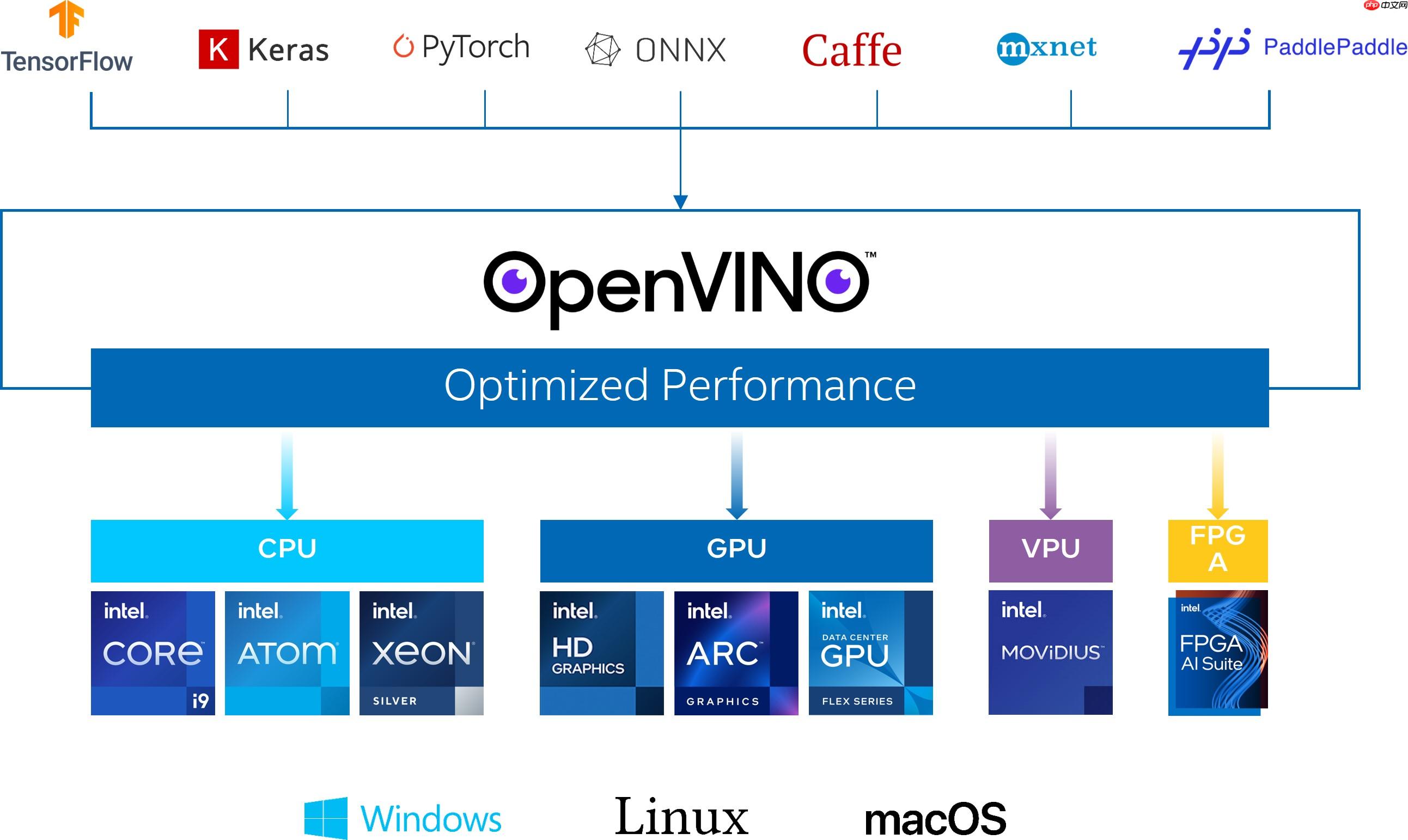
OpenVINO作为Intel原生的深度学习推理框架,可以最大化的提升人工智能神经网络在Intel平台上的执行性能,实现一次编写,任意部署的开发体验。OpenVINO在2025.1版本后,就可以直接支持飞桨模型,大大提升了模型在Intel异构硬件上的推理性能与部署便捷性,带来更高的生产效率,更广阔的兼容性以及推理性能的优化。
! wget "https://paddleocr.bj.bcebos.com/PP-OCRv3/chinese/ch_PP-OCRv3_rec_infer.tar"! tar -xvf ch_PP-OCRv3_rec_infer.tar
使用OpenVINO加载Paddle模型无需经过任何转换,只需要
! pip install openvinoIn [11]
from openvino.runtime import Core# Initialize OpenVINO Runtime for text recognition.core = Core()# Read the model and corresponding weights from a file.rec_model_file_path = "ch_PP-OCRv3_rec_infer/inference.pdmodel"rec_model = core.read_model(model=rec_model_file_path)# Assign dynamic shapes to every input layer on the last dimension.for input_layer in rec_model.inputs:
    input_shape = input_layer.partial_shape
    input_shape[3] = -1
    rec_model.reshape({input_layer: input_shape})

rec_compiled_model = core.compile_model(model=rec_model, device_name="CPU")# Get input and output nodes.rec_input_layer = rec_compiled_model.input(0)
rec_output_layer = rec_compiled_model.output(0)
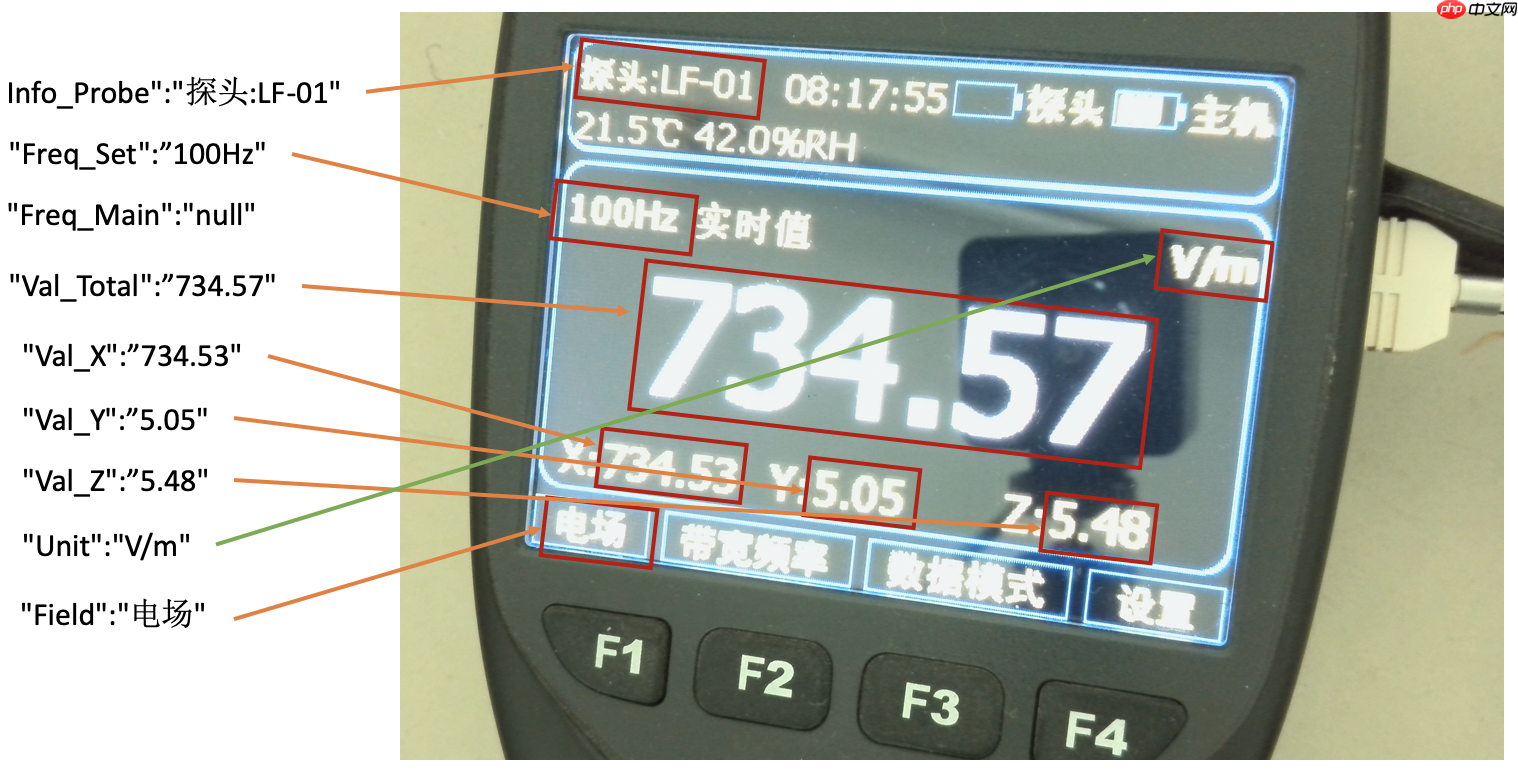
依旧对于上述示例图片,希望结构化输出以下内容:[{"Info_Probe":""}, {"Freq_Set":""}, {"Freq_Main":""}, {"Val_Total":""},{"Val_X":""}, {"Val_Y":""}, {"Val_Z":""}, {"Unit":""}, {"Field":""}]。输出示例如下图所示:
首先,需要基于仿射变换的结果,配置各个元素在图片上的布局。这个配置对于同一批表来说是固定的。
In [13]# features and layout informationDESIGN_LAYOUT = {'Info_Probe':[14, 36, 410, 135], # feature_name, xmin, ymin, xmax, ymax
'Freq_Set':[5, 290, 544, 406],
'Val_Total':[52, 419, 1256, 741],
'Val_X':[19, 774, 433, 882],
'Val_Y':[433, 773, 874, 884],
'Val_Z':[873, 773, 1276, 883],
'Unit':[1064, 291, 1295, 403],
'Field':[5, 913, 243, 998]}
import copyimport math# Preprocess for text recognition.def resize_norm_img(img, max_wh_ratio):
    """
    Resize input image for text recognition

    Parameters:
        img: image with bounding box from text detection
        max_wh_ratio: ratio of image scaling
    """
    rec_image_shape = [3, 48, 320]
    imgC, imgH, imgW = rec_image_shape    assert imgC == img.shape[2]
    character_type = "ch"
    if character_type == "ch":
        imgW = int((32 * max_wh_ratio))
    h, w = img.shape[:2]
    ratio = w / float(h)    if math.ceil(imgH * ratio) > imgW:
        resized_w = imgW    else:
        resized_w = int(math.ceil(imgH * ratio))
    resized_image = cv2.resize(img, (resized_w, imgH))
    resized_image = resized_image.astype('float32')
    resized_image = resized_image.transpose((2, 0, 1)) / 255
    resized_image -= 0.5
    resized_image /= 0.5
    padding_im = np.zeros((imgC, imgH, imgW), dtype=np.float32)
    padding_im[:, :, 0:resized_w] = resized_image    return padding_imdef get_rotate_crop_image(img, points):
    '''
    img_height, img_width = img.shape[0:2]
    left = int(np.min(points[:, 0]))
    right = int(np.max(points[:, 0]))
    top = int(np.min(points[:, 1]))
    bottom = int(np.max(points[:, 1]))
    img_crop = img[top:bottom, left:right, :].copy()
    points[:, 0] = points[:, 0] - left
    points[:, 1] = points[:, 1] - top
    '''
    assert len(points) == 4, "shape of points must be 4*2"
    img_crop_width = int(        max(
            np.linalg.norm(points[0] - points[1]),
            np.linalg.norm(points[2] - points[3])))
    img_crop_height = int(        max(
            np.linalg.norm(points[0] - points[3]),
            np.linalg.norm(points[1] - points[2])))
    pts_std = np.float32([[0, 0], [img_crop_width, 0],
                          [img_crop_width, img_crop_height],
                          [0, img_crop_height]])
    M = cv2.getPerspectiveTransform(points, pts_std)
    dst_img = cv2.warpPerspective(
        img,
        M, (img_crop_width, img_crop_height),
        borderMode=cv2.BORDER_REPLICATE,
        flags=cv2.INTER_CUBIC)
    dst_img_height, dst_img_width = dst_img.shape[0:2]    if dst_img_height * 1.0 / dst_img_width >= 1.5:
        dst_img = np.rot90(dst_img)    return dst_imgdef prep_for_rec(dt_boxes, frame):
    """
    Preprocessing of the detected bounding boxes for text recognition

    Parameters:
        dt_boxes: detected bounding boxes from text detection
        frame: original input frame
    """
    ori_im = frame.copy()
    img_crop_list = []
    for bno in range(len(dt_boxes)):
        tmp_box = copy.deepcopy(dt_boxes[bno])
        img_crop = get_rotate_crop_image(ori_im, tmp_box)
        img_crop_list.append(img_crop)

    img_num = len(img_crop_list)    # Calculate the aspect ratio of all text bars.
    width_list = []    for img in img_crop_list:
        width_list.append(img.shape[1] / float(img.shape[0]))
    # Sorting can speed up the recognition process.
    indices = np.argsort(np.array(width_list))    return img_crop_list, img_num, indicesdef batch_text_box(img_crop_list, img_num, indices, beg_img_no, batch_num):
    """
    Batch for text recognition

    Parameters:
        img_crop_list: processed bounding box images with detected bounding box
        img_num: number of bounding boxes from text detection
        indices: sorting for bounding boxes to speed up text recognition
        beg_img_no: the beginning number of bounding boxes for each batch of text recognition inference
        batch_num: number of images in each batch
    """
    norm_img_batch = []
    max_wh_ratio = 0
    end_img_no = min(img_num, beg_img_no + batch_num)    for ino in range(beg_img_no, end_img_no):
        h, w = img_crop_list[indices[ino]].shape[0:2]
        wh_ratio = w * 1.0 / h
        max_wh_ratio = max(max_wh_ratio, wh_ratio)    for ino in range(beg_img_no, end_img_no):
        norm_img = resize_norm_img(img_crop_list[indices[ino]], max_wh_ratio)
        norm_img = norm_img[np.newaxis, :]
        norm_img_batch.append(norm_img)

    norm_img_batch = np.concatenate(norm_img_batch)
    norm_img_batch = norm_img_batch.copy()    return norm_img_batch
用于将文字识别的结果进行解码,转化为汉字
In [21]class RecLabelDecode(object):
""" Convert between text-label and text-index """
def __init__(self,
character_dict_path=None,
character_type='ch',
use_space_char=False):
support_character_type = [ 'ch', 'en', 'EN_symbol', 'french', 'german', 'japan', 'korean', 'it', 'xi', 'pu', 'ru', 'ar', 'ta', 'ug', 'fa', 'ur', 'rs', 'oc', 'rsc', 'bg', 'uk', 'be', 'te', 'ka', 'chinese_cht', 'hi', 'mr', 'ne', 'EN', 'latin', 'arabic', 'cyrillic', 'devanagari'
] assert character_type in support_character_type, "Only {} are supported now but get {}".format(
support_character_type, character_type)
self.beg_str = "sos"
self.end_str = "eos"
if character_type == "en":
self.character_str = "0123456789abcdefghijklmnopqrstuvwxyz"
dict_character = list(self.character_str) elif character_type == "EN_symbol": # same with ASTER setting (use 94 char).
self.character_str = string.printable[:-6]
dict_character = list(self.character_str) elif character_type in support_character_type:
self.character_str = [] assert character_dict_path is not None, "character_dict_path should not be None when character_type is {}".format(
character_type) with open(character_dict_path, "rb") as fin:
lines = fin.readlines() for line in lines:
line = line.decode('utf-8').strip("\n").strip("\r\n")
self.character_str.append(line) if use_space_char:
self.character_str.append(" ")
dict_character = list(self.character_str) else: raise NotImplementedError
self.character_type = character_type
dict_character = self.add_special_char(dict_character)
self.dict = {} for i, char in enumerate(dict_character):
self.dict[char] = i
self.character = dict_character
def __call__(self, preds, label=None, *args, **kwargs):
preds_idx = preds.argmax(axis=2)
preds_prob = preds.max(axis=2)
text = self.decode(preds_idx, preds_prob, is_remove_duplicate=True) if label is None: return text
label = self.decode(label) return text, label
def add_special_char(self, dict_character):
dict_character = ['blank'] + dict_character return dict_character
def decode(self, text_index, text_prob=None, is_remove_duplicate=False):
""" convert text-index into text-label. """
result_list = []
ignored_tokens = self.get_ignored_tokens()
batch_size = len(text_index) for batch_idx in range(batch_size):
char_list = []
conf_list = [] for idx in range(len(text_index[batch_idx])): if text_index[batch_idx][idx] in ignored_tokens: continue
if is_remove_duplicate: # only for predict
if idx > 0 and text_index[batch_idx][idx - 1] == text_index[
batch_idx][idx]: continue
char_list.append(self.character[int(text_index[batch_idx][
idx])]) if text_prob is not None:
conf_list.append(text_prob[batch_idx][idx]) else:
conf_list.append(1)
text = ''.join(char_list)
result_list.append((text, np.mean(conf_list))) return result_list
def get_ignored_tokens(self):
return [0] # for ctc blank# Since the recognition results contain chinese words, we should use 'ch' as character_typetext_decoder = RecLabelDecode(character_dict_path="ppocr_keys_v1.txt",
character_type='ch',
use_space_char=True)
下面以Freq_Set为例,进行文字识别
In [25]# 输出结构体struct_result = {}
# Crop imgs according the layout informationxmin, ymin, xmax, ymax = DESIGN_LAYOUT['Freq_Set']
crop_img = img[ymin:ymax, xmin:xmax]
h = ymax - ymin # height of crop_imgw = xmax - xmin # width of crop_imgdt_boxes = [np.array([[0,0],[w,0],[w,h],[0,h]],dtype='float32')]
batch_num = 1# since the input img is cropped, we do not need a detection model to find the position of texts# Preprocess detection results for recognition.img_crop_list, img_num, indices = prep_for_rec(dt_boxes, crop_img)# txts are the recognized text resultsrec_res = [['', 0.0]] * img_num
txts = []
for beg_img_no in range(0, img_num): # Recognition starts from here.
norm_img_batch = batch_text_box(
img_crop_list, img_num, indices, beg_img_no, batch_num) # Run inference for text recognition.
rec_results = rec_compiled_model([norm_img_batch])[rec_output_layer] # Postprocessing recognition results.
rec_result = text_decoder(rec_results) for rno in range(len(rec_result)):
rec_res[indices[beg_img_no + rno]] = rec_result[rno]
if rec_res:
txts = [rec_res[i][0] for i in range(len(rec_res))]
# record the recognition resultstruct_result['Freq_Set'] = txts[0]print(txts[0])100H2实时值
上面的逻辑已经完成了使用OpenVINO加载PaddleOCR并进行预测,但实际上由于整个模型没有进行微调,所以对于当前的业务场景来说可能不够完美,这个时候可以通过一些简单的逻辑进行处理,比如,对于示例图片中,H2必然是不存在的,这个地方可以直接通过replace替换为HZ。
简单来说,对于示例图片的这种表,可以定义如下后处理函数:
In [28]# Post-processing, fix some error made in recognitiondef post_processing(results, post_configration):
"""
Postprocessing function for correcting the recognition errors.
Parameters:
results (Dict): The result directory.
post_configration (Dict): The configuration directory.
"""
for key in results.keys(): if len(post_configration[key]) == 0: continue # nothing to do
for post_item in post_configration[key]:
key_word = post_item[0] if key_word == 'MP': # mapping
source_word = post_item[1]
target_word = post_item[2] if source_word in results[key]:
results[key] = target_word elif key_word == 'RP': # removing
source_word = post_item[1]
target_word = post_item[2]
results[key] = results[key].replace(source_word, target_word) elif key_word == 'AD': # add point
add_position = post_item[1]
results[key] = results[key][:add_position] + '.' + results[key][add_position:] return results# 通过配置决定如何进行后处理# Congiguration for postprocessing of the resultsRESULT_POST = {"Info_Probe":[['MP', 'LF', '探头:LF-01']], # words need to be mapped
"Freq_Set":[['RP', '实时值', ''], ['RP', ' ', ''], ['RP', 'H2', 'HZ']], # words need to be replace
"Val_Total":[['RP', 'H2', 'Hz']], "Val_X":[['RP', 'X', ''], ['RP', ':', '']],
"Val_Y":[['RP', 'Y', ''], ['RP', ':', '']],
"Val_Z":[['RP', 'Z', ''], ['RP', ':', '']],
"Unit":[['MP', 'T', 'μT'],['MP', 'kV', 'kV/m'],['MP', 'kv', 'kV/m'],['MP', 'vm', 'V/m'],['MP', 'Vm', 'V/m'],['MP', 'A', 'A/m']],
"Field":[]} # nothing need to do# Postprocessing, to fix some error made in recognitionstruct_result = post_processing(struct_result, RESULT_POST)# Print resultprint(struct_result)
{'Freq_Set': '100HZ'}
为了方便运行,这里也提供了一个封装好的函数
In [32]# 为了避免因为图片模糊导致的漏检,配置一个输出模板,从而让每个图片输出格式都一致# Output template in case 1RESULT_TEMP = {"Info_Probe":"探头:---",
"Freq_Set":"",
"Val_Total":"无探头",
"Val_X":"",
"Val_Y":"",
"Val_Z":"",
"Unit":"A/m",
"Field":"常规"}
In [33]
# the input of recognition should be image, DESIGN information, compiled_modeldef main_function(img, DESIGN_LAYOUT, RESULT_TEMP, preprocess_function=None):
    """
    Main program of processing the meter.
    Parameters:
        img (np.ndarray): Input image.
        DESIGN_LAYOUT (Dict): The coordinates of elements in the screen.
        RESULT_TEMP (Dict): The template for structure output.
        preprocess_function: The preprocess function for cropped images, `None` means no preprocessing to do.
    """
    # copy the structure output template
    struct_result = copy.deepcopy(RESULT_TEMP)    # structure recognition begins here
    for key in DESIGN_LAYOUT.keys():        # Crop imgs according the layout information
        xmin, ymin, xmax, ymax = DESIGN_LAYOUT[key]
        crop_img = img[ymin:ymax, xmin:xmax]
        # preprocessing for cropped images
        if preprocess_function is not None:
            crop_img = preprocess_function(crop_img)

        h = ymax - ymin  # height of crop_img
        w = xmax - xmin  # width of crop_img
        dt_boxes = [np.array([[0,0],[w,0],[w,h],[0,h]],dtype='float32')]
        batch_num = 1

        # since the input img is cropped, we do not need a detection model to find the position of texts
        # Preprocess detection results for recognition.
        img_crop_list, img_num, indices = prep_for_rec(dt_boxes, crop_img)        # txts are the recognized text results
        rec_res = [['', 0.0]] * img_num
        txts = []

        for beg_img_no in range(0, img_num):            # Recognition starts from here.
            norm_img_batch = batch_text_box(
                img_crop_list, img_num, indices, beg_img_no, batch_num)            # Run inference for text recognition.
            rec_results = rec_compiled_model([norm_img_batch])[rec_output_layer]            # Postprocessing recognition results.
            rec_result = text_decoder(rec_results)            for rno in range(len(rec_result)):
                rec_res[indices[beg_img_no + rno]] = rec_result[rno]
            if rec_res:
                txts = [rec_res[i][0] for i in range(len(rec_res))]

        # record the recognition result
        struct_result[key] = txts[0]
    return struct_result
In [34]
img = cv2.imread('example1.jpg')# affine transformations to normalize skewed imagesimg = pre_processing(img, POINTS, DESIGN_SHAPE)

struct_result = main_function(img, DESIGN_LAYOUT, RESULT_TEMP)# Postprocessing, to fix some error made in recognitionstruct_result = post_processing(struct_result, RESULT_POST)# Print resultprint(struct_result)
{'Info_Probe': '探头:LF-01', 'Freq_Set': '100HZ', 'Val_Total': '734.57', 'Val_X': '734.53', 'Val_Y': '5.05', 'Val_Z': '5.48', 'Unit': 'V/m', 'Field': '电场'}
以上就是2025 黑客松获奖作品:基于OpenVINO与PaddleOCR的输出抄表器的详细内容,更多请关注其它相关文章!
# 一键
# 欧莱雅营销推广案例
# 延寿抖音关键词排名
# 红姐网站推广
# 松江网站建设服务
# 乡镇企业导报网站建设
# 武冈网站搜索引擎优化
# seo实战密码 网盘
# 济南网站推广公司排行
# seo工具app 营销
# 大厂建设局网站
# 迄今为止
# 为例
# 如有
# git
# 只需要
# 结构化
# 加载
# 后处理
# 中文网
# 抄表
# type
# warp
# fig
# design
# red
# ai
相关栏目:
【
行业新闻62819 】
【
科技资讯67470 】
相关推荐:
美图第二届影像节发布七款AI影像创作工具
音乐制作元工具AudioCraft发布开源AI工具
“世界上最像人的机器人”接入 Stable Diffusion ,现场完成作画
AI无法对传统文化符号进行解构和创新
腾讯自主研发机器狗 Max 升级,可“奔跑跳跃”完成避障动作
彭博社:苹果Vision Pro曾测试VR手柄追踪方案
赋能金融新生态,多家银行创新应用成果亮相世界人工智能大会
人工智能写作检测工具不靠谱,美国宪法竟被认为是机器人写的
一公司推出喷火机器狗,可喷出 9 米长火焰
“世界人工智能之都”的新烦恼:AI热潮无法拉动大量就业
【原创】奥比中光:与英伟达合作开发的3D开发套件正式发布 连接英伟达AI应用生态
Meta发布音频AI模型,仅需2秒片段模拟真人语音
华为联合合作伙伴 共同发布昇腾AI大模型训推一体化解决方案
Meta开源文本生成音乐大模型,我们用《七里香》歌词试了下
五款 AI 网站构建器,任何人都能快速构建网站
乐天派桌面机器人加入小米米家生态系统,实现与其他智能设备的互联
7条线路感受智慧美好生活,“2025 世界人工智能大会民营企业社会开放日”主题活动启动
映宇宙集团执行总编辑:元宇宙还是要以人为媒介
【首发】首款“消化内镜手术机器人”进入临床尾声,ROBO医疗获数千万元A轮融资
站在社会的高度理解人工智能
利用AI技术更好地发展农村电商
全面拥抱大模型浪潮,ISC 2025打造全球首场AI数字安全峰会
看似低调,实则稳健:字节在AI路上会遇到什么?
苹果AR头显商标与华为撞车,在中国或改名
央视报道!星纪魅族集团车载人机交互技术成世界移动通信大会焦点
Transformer六周年:当年连NeurIPS Oral都没拿到,8位作者已创办数家AI独角兽
Meta将VR头显最低年龄限制从13岁降至10岁
加强高质量数据供应能力,促进通用人工智能大模型领域的创新
羚客系统即将升级,推出全新的AI数字化工具
一文看懂被英伟达看中的九号机器人移动底盘
视觉中国推出AI灵感绘图功能,付费后可在“合法合规前提下使用”
尼康尼克尔Z 180-600mm f/5.6-6.3 VR镜头发布:12499元 拍鸟神器
华为HarmonyOS 4将集|成人|工智能大型模型
谷歌推出新 AI 工具 Imagen Editor,一句话对图片二次创作
生成式AI爆发,亚马逊云科技持续专注创新,助力企业数字化转型
第二届光合组织AI解决方案大赛赛果揭晓
美图影像节演讲实录:191次提及AI,发布7款影像生产力工具
美图设计室2.0使用教程
聚焦WAIC|AI技术支撑大模型探索未来
北京市元宇宙产业创新中心筹建工作正式启动
AI连线 | 专访风平智能CEO林洪祥:让AI数字人拥有漂亮的外表和有趣的灵魂,安全问题是重要考量
工信部信通院发布《2025大模型和AIGC产业图谱》 360智脑覆盖全产业链
AI工具助力公司实施每周4.5天工作制,带来巨大效益
马斯克回应人工智能拯救世界:人类已处于“半机器人”状态
Unity发布Sentis和Muse AI工具,助力创作游戏和3D内容
智能手机应用中的人工智能的重要性
腾讯TRS之元学习与跨域推荐的工业实战
传字节内测对话式 AI 产品,代号「Grace」;马斯克嘲讽苹果 头显;比亚迪 F 品牌定名「方程豹」
再度重仓 AI 赛道,SaaS 巨头 Salesforce 扩大 AIGC 风投基金规模
Snow Kylin登陆中国列车,打造全球首条元宇宙专列
 当前位置:
当前位置:  nothing need to do# Postprocessing, to fix some error made in recognitionstruct_result = post_processing(struct_result, RESULT_POST)# Print resultprint(struct_result)
 上一篇:
上一篇: 返回列表
返回列表